From a paper log to ADIF with Claude
Today (October 10, 2026) I activated Minute Man National Historical Park (US-0745) using Adam’s (AA1N) rig and a random wire antenna. I logged every contact by hand in a Rite in the Rain notebook, then used Claude to turn a photo of that page into an ADIF file. I described my earlier logging practices a while ago, and I moved my home logging to Wavelog after that (here’s my setup). This post covers how I now get from the field notebook into both.
Why I still log on paper
I prefer to log by hand when I’m out in the field. There’s no phone to keep charged and no screen to read in the sun. A pencil works in every weather I’m willing to operate in.
The cost is the typing at home. In my old workflow I re-entered every line into HAMRS, which is slow and easy to get wrong. I had an itch that a photo could scratch.
The page
Here’s the page from today. My handwriting is awful, and this page has a few corrections.
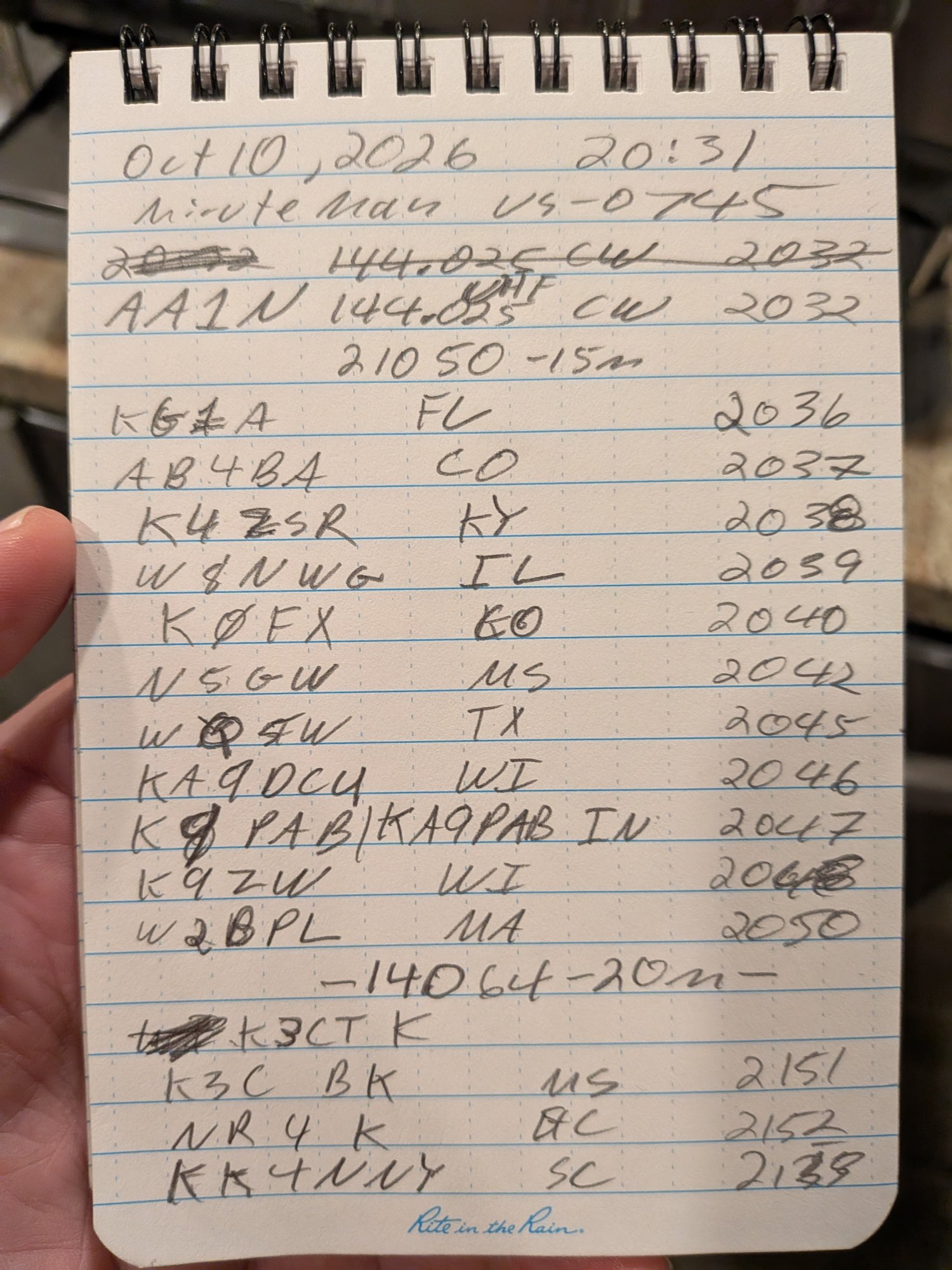
The first contact is unusual. AA1N and I worked each other on 2 meters CW (144.025 MHz), which I’d never done. After that I logged 11 contacts on 15 meters (21.050) and 3 on 20 meters (14.064). Everything was CW.
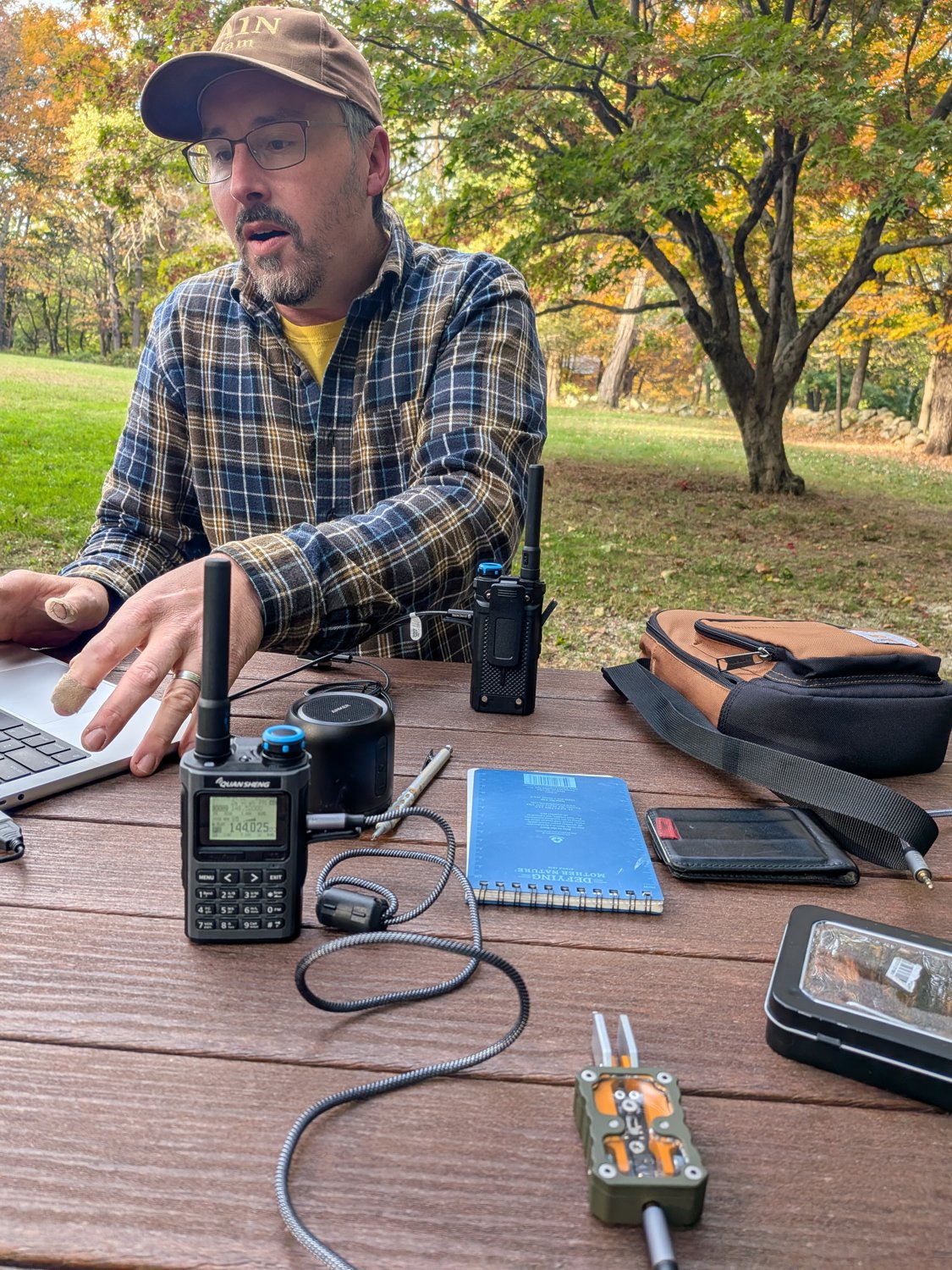
Here’s Adam (AA1N) at our picnic table at Minute Man with a laptop, a pair of handhelds and my notebook.
Here’s a close-up of the handheld set to 144.025 MHz for the 2 meter CW contact.
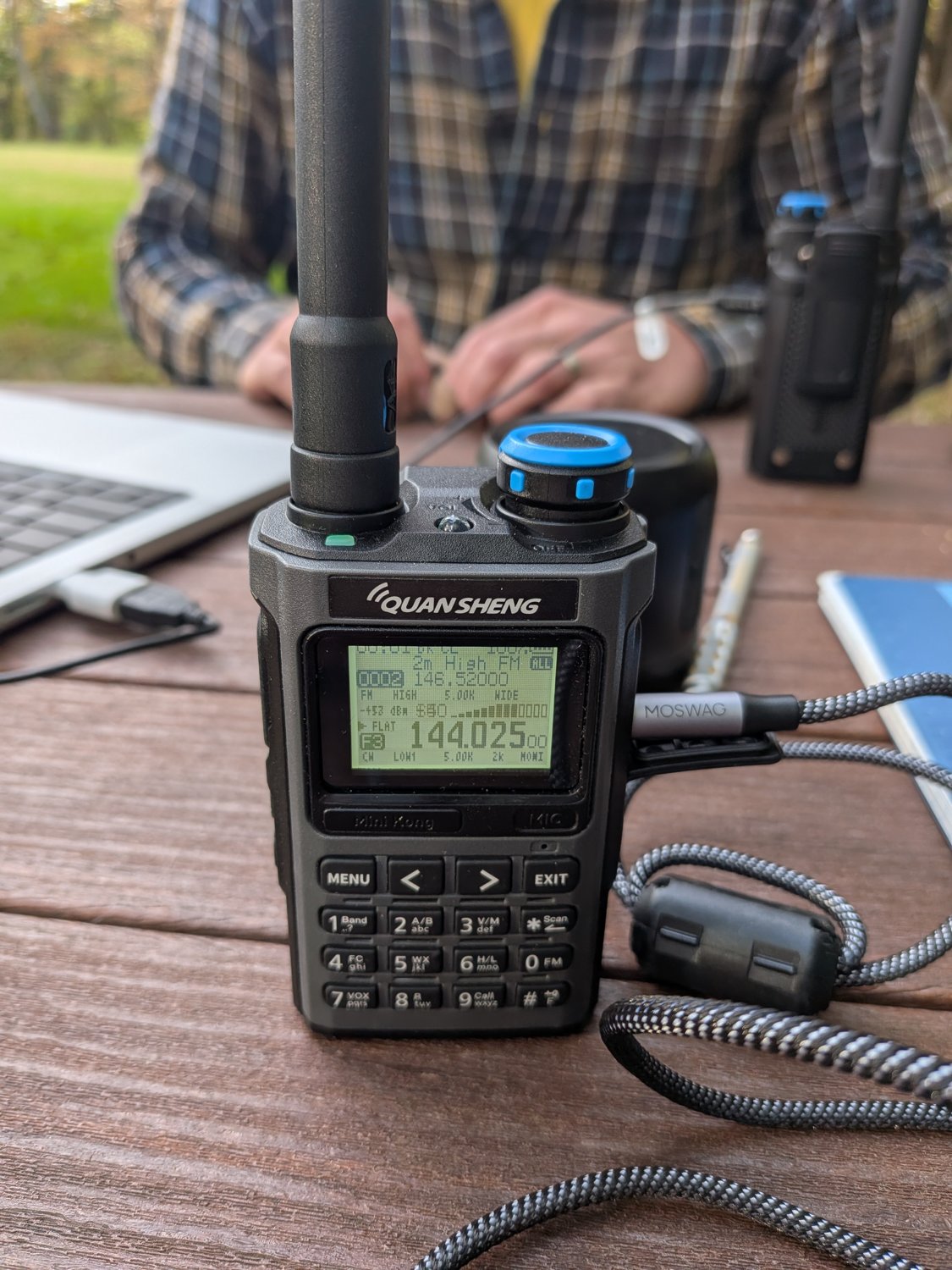
That first contact turned out to matter. Adam is a member of the Brass Knuckle Gang, and working him on CW got me into the gang (more below).
I wrote the frequency once and let it carry forward to the lines below it. A struck line is a rewrite, and a callsign with no time is only a partial copy that never became a contact.
Joining the Brass Knuckle Gang
The Brass Knuckle Gang (BKG) has a website at bkg.club and a Discord server. Members carry numbers. Adam is BKG254.
After my contact, KI7QCF (BKG1) sent me this note:
Congratulations on your CW QSO with AA1N BKG254 on the 2m Band. You are hereby granted BKG700 for time and eternity.
I’m BKG700 now. The note also says I can induct others into the gang. I don’t know much more about the BKG yet, but a 2 meter CW contact I’d never made before got me a membership number.
Working with Claude
I took the photo, opened Claude Code in my ham-radio-utils repo and typed two sentences:
look at most recent jpg in ~/Downloads create an adif from it. note that the 1st contact is unusual, a 2 meter cw contact
That was enough. Claude loaded a skill I wrote (the whole thing is below), found the newest photo, cropped it into strips and read each one. It checked its transcription against every log I’ve already made, then asked QRZ about the calls it was unsure of.
Claude finished with a list of what it couldn’t settle. I answered four questions:
- One time was overtyped. It was 2153.
- Another was overtyped. It was 2048.
- All the contacts were CW.
- This was Adam’s rig with a random wire antenna, which became the comment on every QSO.
Then it built the file, filled in names, towns and grid squares from QRZ, and wrote the park comment on each record.
Checking before I upload
Claude does the typing, but I check every transcribed line against my notebook page before anything gets uploaded. Handwriting misreads are the main way this goes wrong, and a wrong callsign in a submitted log is worse than a missing one. The final file has 14 contacts.
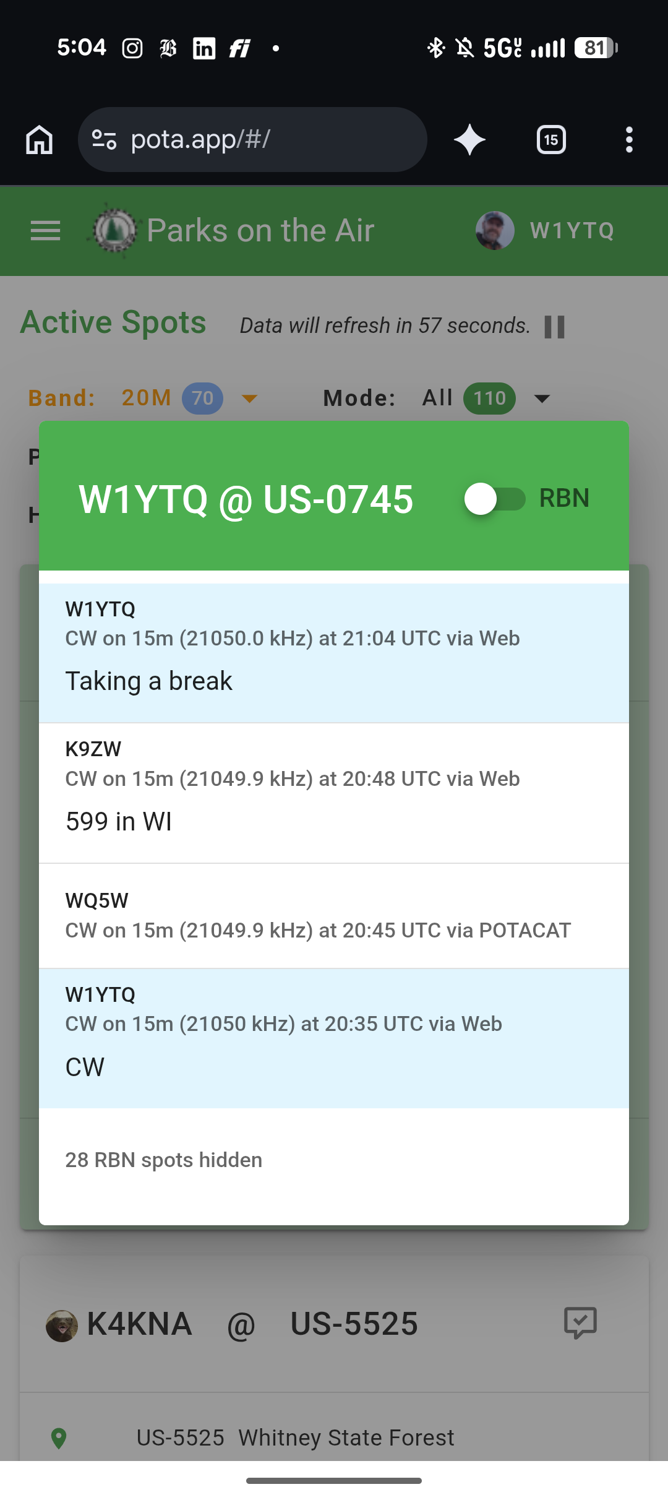
Sometimes I also take screenshots of POTA spots on my phone and hand them to Claude. A spot is a post on the POTA site saying a station is on the air at a given frequency, and hunters post them too. If a spot shows the same call on the same band within a couple of minutes of my logged time, that’s independent evidence I copied the call correctly. Spots usually post a little after the exchange, so they lag my notebook times slightly.
Today’s example is K9ZW. The overtyped digits made the time in my notebook hard to read. K9ZW spotted me at 20:48 UTC on 21049.9 kHz with the comment “599 in WI”. That matches the call, band, time and state in my log.
Wavelog and POTA
Claude leaves me two files in the repo, Minute-Man---US-0745,-October-10,-2026.adi and a .comments.adi copy that adds POTA @ Minute Man using AA1N's rig with random wire antenna to each contact. I upload the result to my Wavelog and to the POTA site. Claude doesn’t touch either site. Uploading is my last check before the contacts are public.
Thank you to all the hunters who worked me today, and to Adam for the rig.
The skill
Claude Code skills are markdown files that tell Claude how to do one job. This one lives in my repo at .claude/skills/photo-to-adif/SKILL.md. Each time a log came out wrong, I told Claude what it missed and we added it here. That’s why it has notes on my U and V, my 4 and 9, and what a struck line means. Here’s the whole thing.
The skill leans on three small Python scripts in my ham-radio-utils repo. build-adif.py writes the ADIF so the length prefixes are always right. enrich-adif.py fills in QRZ data. process-adif.py adds the comment.
---
name: photo-to-adif
description: Convert a photo of a paper POTA log page into a validated ADIF (.adi) file, enriched with QRZ.com data. Use when the user points at a log photo (usually the newest .jpg in ~/Downloads), asks to log an activation from a picture, or mentions turning a paper log, notebook page, or log photo into an adi/ADIF file.
---

# Photo to ADIF

Turns a photographed paper log page into a `.adi` file in this repo, matching
the field layout HAMRS exports so the result imports cleanly to POTA/LoTW/QRZ.

The two scripts are deterministic; your job is the reading and the judgement
calls. Never hand-assemble ADIF text -- length prefixes must be byte-exact and
`build-adif.py` guarantees that.

## Workflow

### 1. Find the photo

Unless the user names a file, take the newest image *or PDF* in `~/Downloads`:

```bash
ls -lt ~/Downloads | grep -iE '\.(jpg|jpeg|png|heic|pdf)$' | head -5
```

Read it. **Confirm it is actually a log page and not one you have already
logged** -- compare its date and callsigns against existing `.adi` files here
before doing any work. If it duplicates an existing log, or is not a log page
at all, say so and stop rather than producing a redundant file.

**If the source is a PDF** (e.g. from a scanner app), do not hand it to `sips`
directly -- `sips -s format png` rasterizes at whatever low resolution the PDF
declares (a scanner-app PDF from this repo's own history came out at
654x1000, too low to read handwriting even after upscaling with `-Z`, since
upscaling adds no real detail). Render at a real DPI with `pdftoppm` instead:

```bash
pdftoppm -r 400 -png input.pdf hires   # writes hires-1.png at ~3600x5500+
```

`pdftoppm` ships with poppler (`brew install poppler` if `which pdftoppm`
comes back empty). 400 DPI has been enough to resolve individual letterforms
on a handwritten log; go higher if a callsign is still unreadable.

### 2. Read the header

The first two lines carry the session: date, start time UTC, park name, POTA
reference, and usually the frequency.

**Crop with Python/PIL, not `sips -c`/`--cropOffset`.** `sips -c H W` alone
*centers* a crop of that size on the image regardless of `--cropOffset` --
there is no reliable way to anchor a `sips` crop at an arbitrary top-left
point, and time can be lost assuming `--cropOffset` means what the name
suggests. PIL's `.crop((x0, y0, x1, y1))` takes an exact box and is
predictable:

```bash
python3 -c "
from PIL import Image
im = Image.open('hires-1.png')
w, h = im.size
n = 6                                   # number of vertical slices
sh = h // n + 200                       # slice height, with overlap
y = 0
i = 0
while y < h:
    im.crop((0, y, w, min(y + sh, h))).save(f'seg{i}.png')
    y += sh - 200                       # 200px overlap so no line is split
    i += 1
"
```

Read each `segN.png` in order top to bottom. Handwriting misreads are the main
failure mode of this skill, so zoom further into any single line that's still
ambiguous with a second, tighter `.crop()` call rather than guessing from the
overview slice.

### 3. Transcribe, applying these rules

| On the page | What it means |
|---|---|
| Callsign with **no time** | Not a contact -- a partial copy. **Exclude it.** |
| Callsign **and** time both struck through | Deleted contact. **Exclude it.** |
| Struck trailing characters only | A correction. Log the corrected call. |
| Frequency written once | Carries forward to later lines until a new one appears. |
| Several indented fragments around one timed line | Progressive copy of one call. Ambiguous -- ask. |
| Callsign **and** time both present, but no RST exchanged | Not a real QSO. **Ask the user**, don't assume it's loggable just because it has a time. |

The third column is normally a state or province, but not always: it can hold
a park reference or an unreadable scrawl. Treat a value that is not a valid
state/province abbreviation as suspect and ask -- and don't assume a
two-letter value is an acknowledgement rather than a state; `OK` is
Oklahoma, not "okay."

**Frequency/mode changes aren't always their own line.** Usually a change
shows up as a line with *just* a frequency (optionally plus mode), and it
governs every contact below until the next such line. But an operator can also
write a new frequency inline on a QSO row, mid-list, without giving it its own
line -- treat that as a change that applies to that one contact (and
subsequent ones, until the next explicit change), not as a stray note to
ignore. **Mode is stickier and less reliable than frequency**: an operator
typically writes "SSB" (or similar) only once, when first switching off the
implicit default (CW here -- see `build-adif.py`'s `DEFAULTS`), and then
reverts to CW *without writing anything down* at some later point. The page
alone cannot always answer "did we go back to CW yet," and guessing wrong
mislabels a real contact's mode. When a mode reversion isn't marked anywhere
and later frequencies straddle both a CW and an SSB sub-band for that ham
band, ask the user rather than infer it from band-plan sub-ranges alone --
they may simply remember, and memory beats a guess.

**All times on these pages are UTC**, and ADIF `TIME_ON` is UTC by definition,
so times transcribe straight across with no conversion. Never shift them to
local time. The header usually states "UTC" explicitly; assume it regardless.

**A `US-####` in the state column is a park-to-park contact**, not a state. It
becomes `SIG`/`SIG_INFO` (the *other* station's park), distinct from
`MY_SIG`/`MY_SIG_INFO`. Pass it to `build-adif.py` as `their_park`.

**Chris's handwriting idiosyncrasies:**

- He tails his **U** to distinguish it from **V** -- his U and V otherwise look
  alike. A letter that could be either is a U if it has a small extra stroke
  off the top or side. Confirmed on the Sept 5, 2026 Minute Man (US-0745) log:
  a call first transcribed as "K9UPL" (no QRZ match) was actually **K9VPL**
  (IN, matches the page's state column) -- read as U/V-ambiguous, and Chris
  confirmed the tail convention directly when asked about the mismatch.
- Don't stop at the first plausible correction for an ambiguous letter --
  cross-check it against the page's state column and QRZ like any other call
  (step 4 / 7a) even after you think you've resolved it. On the same log, a
  call first "corrected" to KO4ZUJ (matching the GA state on the page) was
  still wrong -- the real call was **KN4ZVJ** (also GA). Both looked like
  plausible fixes; only the QRZ lookup told them apart. A guess that happens
  to match the state on the page is not automatically the right call --
  it just clears the same bar a wrong-but-real call can also clear.
- His **4 and 9 can look similar** in a callsign digit. On the Sept 19-20,
  2026 Boston Harbor Islands (US-2421) log, a call first read as "K68YT" (no
  QRZ match at all) turned out to be **KG8YT** -- QRZ confirms Bruce Anderson
  in Marquette, MI, matching the page's MI exactly. Chris caught it himself
  from the **timestamp sequence**, not the glyph: the surrounding QSOs ran
  1804, 1805, 1806, 1808, 1812 -- a call logged as "68YT" broke that
  ascending pattern in a way "G8YT" (still just a misread digit vs. letter,
  not a 4/9 swap in that instance) didn't. More generally: when a timed
  sequence of QSOs has one entry whose time is a digit off from strict
  ascending order (e.g. 1814 sitting between 1812 and 1818 where 1819 would
  fit better after the *next* logged time), re-examine that entry's time
  digits for a 4/9 mixup before accepting it -- the same Sept 19-20 log had
  WC1D mistranscribed as 1814 (out of order, sitting before KG9HV's 1818)
  when the actual time was **1819** (correct order, right after KG9HV).
  Treat a sequence break as a hint to re-check both the callsign *and* the
  time on that line, not just one or the other.

### 4. Cross-check against the logs already here

The repo's `.adi` files are a free local callsign index -- these are repeat
hunters, so most calls have been worked before. A hit that matches the state
you read off the page is strong confirmation you read the call correctly:

```bash
python3 -c "
import re,glob
calls={}
for fn in glob.glob('*.adi'):
    for r in re.split(r'<[Ee][Oo][Rr]>', open(fn, errors='ignore').read()):
        f={m.group(1).upper():m.group(3) for m in re.finditer(r'<(\w+):(\d+)(?::\w)?>([^<\n]*)',r)}
        if f.get('CALL'): calls.setdefault(f['CALL'].upper(), f)
for t in ['W9GTA','KA2IWK']:   # <- candidate calls
    v=calls.get(t)
    print(t,'->',(v.get('NAME'),v.get('QTH'),v.get('STATE'),v.get('GRIDSQUARE')) if v else 'MISS')
"
```

Look up plausible *variants* too (`N5SAR` vs `W5SAR`, `KD0OK` vs `KO0OK`) -- if
exactly one variant exists and its state matches the page, that settles it.

**A call with no state written on the page can still be corroborated** if
it's a repeat hunter: run the same lookup after enrichment fills the state
from QRZ, and compare that state against what this *same call* logged as its
state in a *prior* activation here. Two independent QRZ/enrichment passes on
different days landing on the same state is a real (if softer) confirmation,
even though neither one is a page-written value -- report it as such rather
than leaving the call flagged "unverified" with no further comment. On the
Sept 5, 2026 Minute Man log, KM4CU and N1XK had no page state, but both had
been worked before at other activations in this repo with a state matching
what QRZ filled in this time, which is worth surfacing to the user as
corroboration even though it isn't as strong as a page-written cross-check.

**If the user has RBN/spot screenshots** (from pota.app, a spotting app, etc.),
these are a second corroboration source distinct from the repo's own logs --
check every plausible-but-uncertain call against them, not just calls the user
happens to mention. A screenshot entry is a hit if it shows the *same call* on
the *same band/mode* at a time within a couple of minutes of what's on the
page (RBN/spot timestamps typically lag the paper log's QSO-start time
slightly, since the spot is posted after the exchange). A hit is strong
independent confirmation of the call itself, on top of (not instead of) the
QRZ/repo-history checks above -- report which logged QSOs are spot-confirmed
and which aren't, since it tells the user where the log rests on transcription
alone versus outside evidence.

### 5. Ask about anything ambiguous

**Always ask the user about callsigns you cannot read with confidence.** Do not
guess and do not silently drop them. Batch the questions, give the candidate
readings you are choosing between, and say what each one implies.

The user often has outside information (spot screenshots on their phone, memory
of the contact) that resolves a call instantly. Asking is cheap; a wrong
callsign in a submitted log is not.

### 6. Build the file

Write a session JSON, then generate:

```json
{
  "date": "20260618",
  "freq": "14.041",
  "park": "US-8399",
  "my_gridsquare": "FN42kj",
  "qsos": [
    {"time": "1502", "call": "WA4NKL"},
    {"time": "1505", "call": "VE3CMI", "state": "ON", "country": "CANADA", "dxcc": "1"},
    {"time": "1517", "call": "WA8OJR", "state": "OK"}
  ]
}
```

```bash
./build-adif.py session.json -o "Alewife-Brook---US-8399,-June-18,-2026.adi"
```

Include only what the paper log records. Leave `name`/`qth`/`cnty`/`gridsquare`
out and let step 7 fill them. `BAND` is derived from `freq`; US `COUNTRY`/`DXCC`
default in. Defaults for operator, power, mode and `MY_STATE` live at the top of
`build-adif.py`.

`my_gridsquare` is per-park -- lift it from an existing log for that park
(`FN42kj` Alewife Brook, `FN42hl` Minute Man) rather than reusing the last one.

**Filename convention:** `Park-Name---US-####,-Month-D,-YYYY.adi`, hyphens for
spaces, matching the files already here.

### 7. Enrich from QRZ

```bash
./enrich-adif.py "Alewife-Brook---US-8399,-June-18,-2026.adi"
# review the dry run, then:
./enrich-adif.py "Alewife-Brook---US-8399,-June-18,-2026.adi" --apply
```

Auth is `qrz_username`/`qrz_password` in `.env` -- `enrich-adif.py` logs in at
the start of every run and trades them for a session key, since QRZ session
keys have no guaranteed lifetime and cannot be cached indefinitely. Username is
the QRZ.com callsign, not an email address. Lookups themselves are cached in
`.qrz-cache.json` so the dry run and the `--apply` run do not each cost a
lookup against the account.

`enrich-adif.py` only ever *fills* empty fields. It never overwrites a logged
value; disagreements get reported instead, so the user's readings win by
default and conflicts stay visible.

### 7a. Treat every state conflict as a suspected misread

This is the highest-value check in the whole workflow. When QRZ's state
disagrees with the page, there are two explanations, and the wrong one is the
comfortable one:

1. The operator was portable, away from their home address.
2. **You misread the callsign, and it resolved to a real licensee elsewhere.**

A wrong call usually still exists. That is what makes this failure mode
dangerous: enrichment succeeds, fills in a plausible name and city, and nothing
looks broken. On the June 18 log, four of sixteen contacts conflicted and two
were misreads.

So before accepting travel, generate variants of the conflicting call -- vary
the digit, vary the prefix letter -- look each up, and check whether any lands
in the state on the page. A variant that matches the page state is almost
certainly the real call:

| Logged | QRZ home | Variant found | Verdict |
|---|---|---|---|
| N5SAR | TX | **W5SAR** in SC | misread; page said SC |
| WB2NQQ | no record | **KB2NQQ** in NY | misread; page said NY |
| WA8OJR | SC | none in OK | genuine travel |

Ask the user before applying any correction. Where no variant matches, travel
is the reasonable conclusion.

**Check the call's POTA activity history, not just QRZ, before concluding
either way.** `pota.app` shows a hunter's own activation and hunt history --
if the same call has activated or hunted from the conflicting state before,
or from other states generally, that's direct evidence they travel/operate
portable, stronger than "no QRZ variant matched." It can also settle a
**mode** doubt the same way: if a page shows a call worked in CW but nothing
on the page confirms the operator uses CW, prior CW activity for that call is
real corroboration, the same class of check as the state one. This is a
separate source from QRZ (home address) and from this repo's own prior logs
(calls *you've* worked before) -- all three can be checked and don't always
agree.

The public API (`api.pota.app/stats/user/<call>`) only exposes *aggregate*
counts (total activations, parks, QSOs) -- it does not break activity down by
state or mode without the user's own authenticated session, so it cannot
directly confirm "this call has activated from state X" or "this call uses
CW" via API alone (confirmed on the Sept 5, 2026 log: `/activator/activations`
and similar per-park endpoints returned "Missing Authentication Token" for
KD9K and KM4INW). Where this per-state/per-mode detail matters, check
`pota.app`'s own site in a browser (the user may already be logged in there)
or ask the user, who can see their own hunted history for that call in the
app. An aggregate count with no state/mode breakdown is **not** evidence
against travel or a given mode -- absence of a visible signal only means the
check was inconclusive, not that the logged value is wrong.

**The travel rule.** For confirmed travel, QRZ's city, county and grid describe
the wrong place, so those are skipped and only the logged state is kept. Grid
drives distance and awards math, so a home grid on a portable contact is a real
error, not a cosmetic one. Note also that a state mismatch is not evidence of a
mis-copy in itself: check whether the two are plausibly confusable in Morse
first (`OK` `--- -.-` and `SC` `... -.-.` share nothing).

A call with no state on the page has no cross-check available. Enrichment will
still fill it, but that data is unverified -- say so when reporting.

### 7b. Park references override QRZ location, always

When a QSO carries the other station's park (`SIG_INFO`), `enrich-adif.py`
fetches that park from `api.pota.app` and uses **the park's grid, not the
operator's**. This applies whether or not the operator looks portable: an
activation happens at the park, so the park is where they were. QRZ's grid is
derived from their home address and would place the contact somewhere else
entirely -- often hundreds of miles off.

The same pass replaces `STATE` with the park's state and drops the home
`QTH`/`CNTY`. It is the one place enrichment deliberately overwrites existing
values, and every change is reported.

Parks spanning two states (`locationDesc` like `US-FL,US-MS`) keep the logged
state, since the park reference alone cannot say which side the operator was
on. Their single published grid may still be on the wrong side -- flag it.

Report any calls QRZ cannot find; the record stays valid ADIF without those
fields.

### 8. Add the POTA comment (always)

**Run this after step 7, never before.** `process-adif.py comment` copies the
*entire current record set* -- including every enriched field, not just the
comment -- into the sibling file. Run it before `enrich-adif.py --apply` (or
re-run it again afterward) and the `.comments.adi` file silently ends up
missing NAME/QTH/GRIDSQUARE/etc that the main `.adi` has, with no error to
flag the mismatch. If both files exist already, compare their mtimes before
trusting either -- `ls -la *.adi` -- and if the comment file is older than the
last enrichment `--apply`, delete and regenerate it.

Every activation gets a comment naming the park. Do this automatically, without
being asked:

```bash
./process-adif.py comment "Alewife-Brook---US-8399,-June-18,-2026.adi" \
  --comment "POTA @ Alewife Brook"
```

This writes a sibling `.comments.adi` alongside the original; it does not modify
the input file. Both files stay in the repo, matching every previous activation.

**Format is `POTA @ <park name>`**, with an `@`, not the word "at" -- that is the
convention in every existing comment file here.

**Which park name?** Check what previous logs for that POTA reference used:

```bash
grep -ho "<COMMENT:[0-9]*>[^<]*" *.comments.adi | sort | uniq -c | sort -rn
```

The repo is inconsistent about full park names (US-8399 appears as "Alewife
Brook", "Alewife Brook State Reserve", and "Alewife Brook Parkway" across
filenames), so the comment history is the authority, not the filename. If the
park has never been logged before, or prior comments disagree, **ask the user
for the park name rather than guessing.**

Operators sometimes want extra detail appended (rig, antenna, band list, who
they were with) -- e.g. `POTA @ Alewife Brook w KH1 w/ wire in tree`. Do not
invent these. Add them only if the user says so.

### 9. Validate

```bash
python3 -c "
import re
d=open('FILE.adi',encoding='ISO-8859-1').read()
ok=True
for m in re.finditer(r'<(\w+):(\d+)>',d):
    n=int(m.group(2))
    rest=d[m.end()+n:].split('<')[0]
    if rest.strip():
        ok=False; print('CORRUPT:',m.group(1),repr(rest[:20]))
print('spec-conformant:',ok,'| records:',d.lower().count('<eor>'))
"
```

Read exactly N characters after each tag; **whitespace after the declared length
is a legal separator, not corruption.** A naive check that reads to end-of-line
reports hundreds of false errors on anything `process-adif.py` writes, because
`adif_io` emits a trailing space after every value. Do not "fix" that.

Report QSO count, excluded entries and why, and every unresolved or conflicting
field. Never report a log as complete while a callsign is still a guess.

## Setup notes

Enrichment needs credentials, in `.env` (gitignored):

```
qrz_username=...   # QRZ.com callsign, not an email address
qrz_password=...
```

QRZ runs two separate APIs and they do not share credentials:

- **XML API** (`xmldata.qrz.com`) -- third-party callsign lookups. This is what
  enrichment uses. It has no persistent API key (confirmed against QRZ's
  current spec page, `https://www.qrz.com/page/current_spec.html`): every run
  logs in with `qrz_username`/`qrz_password` and trades them for a session
  key, since session keys "have no guaranteed lifetime" per QRZ's own docs and
  cannot be cached across days. Requires an active XML subscription; without
  one QRZ returns a reduced field set. Protocol reference:
  `docs/qrz-xml-interface-spec.md`.
- **Logbook API** (`logbook.qrz.com/api`) -- the user's own logbook, authenticated
  by a *different* key (`qrz_logbook_api_key`). It uploads and fetches QSOs but
  has no third-party lookup endpoint at all (confirmed against
  `https://www.qrz.com/docs/logbook/QRZLogbookAPI.html`), so it cannot drive
  enrichment regardless of key. It is the route to consider for uploading a
  finished log.

Field-name trap: the XML API returns the **city in `addr2`**, not in a field
called `city`. Anything mapping `city` will silently produce empty `QTH`.

There is a compiled third-party client at `~/source/qrzclient`, but it is not
used and not needed. It only authenticates via username+password and offers no
way to supply a session key, so it adds nothing over calling the XML API
directly.
Going forward
I plan to keep logging on paper and let Claude do the typing. The skill gets better every time a log fails in a new way. I’d love to hear how other operators go from a paper log to a digital one.